pico-llm: From 9M to 4B Parameters on a $1 Microcontroller
How far can modern LLM inference go on extremely underpowered hardware?
I ran a 600M-parameter LLM on a $1 microcontroller with only 520 KB of RAM. It's not fast, generating one token every 19 seconds, but that's faster than you might initially think. A 50-token answer takes around 22 minutes to generate when you include the chat-template prompt (the prompt alone takes 6 minutes), which I'd argue is usable for anything that can wait. Imagine a sensor that writes a one-line summary every hour, or maybe an overnight batch job.
Running a modern LLM at real-time speeds takes expensive hardware, and I don't have an NVIDIA B200 sitting at home. But someday, the answer from a superintelligent model may be worth the hours, days, or even years it takes to generate. Sadly (or thankfully), we don't live in that future yet. Still, the idea of running a real LLM on something with the compute and power budget of a Bluetooth speaker or smart bulb, with no operating system, no frameworks, and no GPU, consumed me.
I started with a 9M-parameter test model, worked my way up to a 4B-parameter reasoning model, and got my fastest result by going back to 600M with some needed optimizations to hardware and software. Here's how I did it.
The Setup
Our target is the RP2350, a dual-core Arm Cortex-M33 microcontroller that runs at 150 MHz with 520 KB of RAM. The chip costs ~$1 and I used it on the $5 Raspberry Pi Pico 2 dev board. For scale, 520 KB is roughly 1/15,000th the RAM of an iPhone, before you even count the GPU and neural accelerators Apple builds into its chips for exactly this kind of work. The situation is not all bad, though. The RP2350 is quick for a low-cost microcontroller, and it's thousands of times more powerful than the Apollo Guidance Computer that took people to the moon in the 1960s. Still, running the extremely computationally intensive tasks that we typically use million-dollar GPU clusters for will involve overcoming a lot of roadblocks.
The first and biggest obstacle is that no modern LLM will fit in the RP2350's RAM. By "modern LLM" I'm talking about recent transformer language models being released for usage as chatbots or agentic AI. Even the smallest models AI labs release are hundreds of megabytes to gigabytes in size. So clearly this is impossible, right? Not necessarily.
At its core, running an LLM (called inference) is a long chain of matrix multiplications, and each one uses a different chunk of the model's weights. Normally, the whole model is loaded into the large, fast memory of a GPU or other AI accelerator, and thousands of cores run those multiplications in parallel. We have almost no RAM and only two cores.
The solution: stream everything. For each token generated, the model uses each layer's weights sequentially exactly once. All we have to do is store the weights in that same order. We can then stream them through a small buffer in RAM, so we only hold a tiny fraction of the model in memory at any one time.
Then we are left with the question: where are we going to stream the model from? Working on bare metal gives us plenty of options, including eMMC, NAND or NOR flash, a USB drive, or an SD card. I went with microSD because the cards are cheap, easy to find, fast, and available in large sizes. Most importantly, the SDIO_RP2350 library already implements 4-bit SDIO, the SD card's fast native mode, using the RP2350's PIO (programmable I/O) blocks. In its default configuration, SDIO tops out around 12.5 MB/s, several times faster than the SPI mode most microcontroller projects use. That speed matters, because generating each token will require reading the entire model off the SD card.
With the memory roadblock taken care of, we can move on to building the inference engine.
The Engine
Like I mentioned up top, we have no OS or frameworks to help us, so we'll need to build the complete inference pipeline ourselves. There isn't even a filesystem on the SD card; the model is written to the SD card's raw storage blocks. But this also means no OS, frameworks, or filesystem overhead to slow us down.
For inspiration, I looked to Andrej Karpathy's llama2.c, a Llama inference engine in a single C file. Our inference engine will also be written in C and will similarly implement the standard llama style transformer. This way we should easily be able to run various open-source models on our engine.
Each layer of a transformer has two different halves. The attention section lets the current token look back at the tokens before it, and the feed-forward network (FFN) then processes the result. The engine runs each layer in three separate phases:
- Stream the attention weights. Read weights off the SD card and multiply them with the current token's data to get its query, key, and value vectors (Q, K, V). The weights arrive in tiles, as many rows as fit in a 32 KB buffer, and the multiplication uses fast int8 integer math. Then apply RoPE (rotary position embedding), which tells the model where the token sits in the sequence.
- Pause streaming and run attention. Write this token's K and V to the SD card, then read back the K and V of every earlier token and compute attention. The card can only do one read or write at a time, so the weight stream has to wait. Attention uses an "online" softmax that keeps running totals, so we never hold all the attention scores in memory at once.
- Resume streaming and finish the layer. Read the rest of the layer's weights for the attention output projection and the FFN (a SwiGLU network, the same kind Llama uses).
The KV cache (the saved keys and values for every earlier token) also lives on the SD card next to the model. Typically, on a GPU, it sits in memory next to the model. On our hardware it's too big to live in memory: for Qwen3-0.6B, which we'll get to later, it grows by about 230 KB with every token, nearly half the chip's RAM. Keeping it on the card means RAM only needs the current token's working data and two 32 KB streaming buffers. The downside is a lot of extra reads from the SD card. Every layer re-reads the keys and values of all earlier tokens, so each new token takes a little longer than the last.
On the hardware side, things are simple at this point: a Pico 2 dev board wired to a microSD card through an SD card adapter on a breadboard. Programming and communication both happen over USB for simplicity.
A Model to Test With
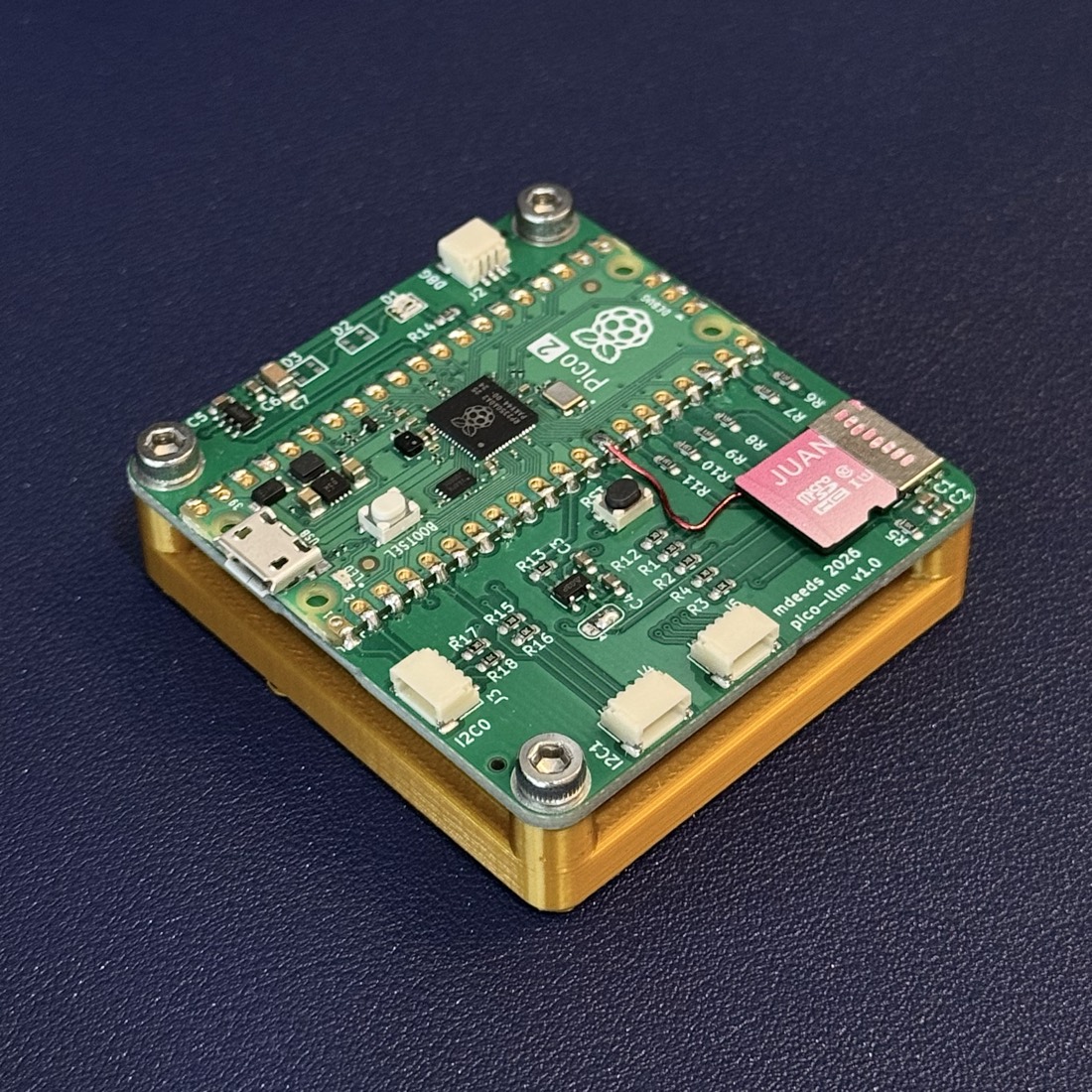
The first SD card tests on the breadboard didn't go well. The card wouldn't get past initialization. I assumed it was signal integrity problems from the breadboard wiring and designed a custom PCB (thank you cheap Chinese PCB manufacturers). The PCB is essentially just the Pico 2 board connected to a microSD card slot, and also gives the opportunity for some PCB art (see below). When pushing the card to its top speeds, clean traces would matter so it's good to get this step out of the way.
While the boards were being made, I still needed a model to test the engine with. I expected a model like Qwen3 to take minutes per token, and it's hard to debug a pipeline when every response takes hours.
So I trained my own: a 9M-parameter Llama-architecture model with 256 dimensions, 6 layers, 4 attention heads, and an 8K-token vocabulary. I trained it on the TinyStories dataset for 15K steps (about 7.5 hours) on my MacBook. It's big enough to write coherent English, which is all this test needs, and small enough to be (relatively) fast on our hardware.
This model tests the export tooling as well as the engine. With no filesystem or file-format parser on the device, standard model formats are out. Instead, the export script quantizes the weights to int8 and writes them to the SD card's raw blocks, in the order the engine uses them. The result is about 15 MB on the card. To check the export, I wrote a NumPy version of the forward pass that runs on my laptop and reads the exported file. It picks the same top next token (argmax) as the original model 100% of the time.
When the boards arrived and the SD card still wouldn't initialize, I knew there was a bigger problem than just signal integrity. The main issue was on the board itself: the ground pour connected to the SD card's ground wasn't connected to the Pico's ground. An easy enough fix with a piece of wire. The other issue was the SDIO library was compiled with its example defaults, so it was talking to GPIO 34–39 instead of 10–15. The Pico 2's chip doesn't even have GPIO 34–39. Maybe the breadboard was never the real problem.
With those bugs fixed, inference finally ran. The only output was token 8190 repeating. With no tokenizer on the device yet, the model only printed raw token IDs. The bigger issue was that the logits, the model's score for each possible next token, were about 1,000 times too large. There was a problem in the streaming code, so the model was multiplying by garbage. With that fixed, the board finally wrote coherent English: "Once upon a time there was...", at about 1 second per token. Real progress! But with progress comes the opportunity for optimization. How much performance is being left on the table? And while we don't have the thousands of cores of a GPU, we do have more than one core.
Going Dual-Core
Up till this point, the firmware ran everything sequentially on one core. Read a buffer of weights from the SD card, multiply, read the next buffer, multiply, over and over. Each step waited on the other. Generating a token took roughly half a second of reading plus half a second of math. But the RP2350 is a dual-core chip. What if Core 0 handled all the SD card I/O while Core 1 did the matrix multiplication?
My first attempt had Core 1 reading ahead from the card, but the SD library's commands hung when sent from Core 1, so all the I/O stayed on Core 0. The split that worked relies on DMA (direct memory access), which moves the card's data into RAM without the CPU copying each byte. While Core 1 multiplies the current tile of weights, DMA fills the next 32 KB buffer in the background.
Now we're really cooking. This change gave a 1.46x speedup on the 9M model, from about 1 second per token to 0.69 seconds. Saving 0.3 seconds a token may not sound like much, but once we're waiting minutes per token, a speedup like that is a big deal.
Making It Interactive
It would also be helpful if instead of just raw token values like <1234> being output, we had more of a chatbot style interface for interacting with the model. That took three pieces: a greedy longest-match tokenizer to turn a typed prompt into tokens, an on-device BPE decoder to turn the model's output back into text, and an interactive chat style loop. This allowed me to type a prompt over USB serial and watch the reply stream back in real time.
A working LLM chatbot on a microcontroller! But with only 9M parameters and being trained on children's stories, it isn't a genuinely useful AI; it's a proof of concept. It was time to try a real model.
Qwen3-0.6B: A Real Open-Source Model
With the engine and tooling validated, the target was the Qwen3 family of models. The weights are open, the models are widely used, and they're built from the same pieces as our test model (SwiGLU, RMSNorm, RoPE), with a few minor differences. Qwen3-0.6B has about 66 times the parameters of the test model. We're going from 15 MB on the SD card to 570 MB, from 256 dimensions to 1,024, and from an 8K vocabulary to 151K. It's still tiny compared to proprietary models from OpenAI or Anthropic, but it's a stepping stone to something bigger.
The first wall was the logits. The classifier at the end of the model produces a score for every token in the vocabulary, and float logits[151936] takes 608 KB, more than the chip's entire 520 KB of RAM. The solution to this problem is the same as the rest so far: streaming. The engine runs the 151K-row classifier in 256-row chunks and only remembers the best score seen so far (the argmax). Qwen3's vocabulary also won't fit in RAM for tokenization, so that had to be moved off-device via a Python serial helper. If we want to get this model running on this microcontroller, some sacrifices have to be made.
Qwen3 differs from the test model in the following ways:
- Grouped-query attention: 16 query heads share 8 key/value heads, two query heads to each key/value head.
- QK-Norm: an extra normalization step on Q and K before attention.
- Wider attention heads: each head is 128 values wide, even though 1,024 / 16 = 64, so the Q projection outputs 2,048 values instead of 1,024. The tiled multiply handles non-square matrices without changes.
- Split-half RoPE: Qwen3 pairs each position-encoding dimension with the one half a head away, instead of with its neighbor.
After making the required code changes, flashing the firmware, and writing 570 MB to the SD card, all that was left was to wait. Fifty-five seconds later, a token appeared in the serial terminal. A real 600M-parameter model was running on a microcontroller and writing "real" text. Real in quotes, because the output was repetitive and confusing. Not what I expected from a model this much larger than the test model. Surely the output should be better than this?
Sampling Without Logits
Part of the problem was how the engine picked tokens. It always took the single highest-scoring one (greedy decoding), which tends to get stuck in loops. Most LLM apps sample instead: they pick randomly among the likely tokens, with a temperature setting that controls how adventurous the choice is, and a repetition penalty that discourages repeats. But standard temperature sampling needs the full list of scores and there's no way we can store that.
The fix is some math the pros call the Gumbel-max trick. Add a specific kind of random noise (Gumbel noise) to each score, take the highest score, and you get the same result as sampling from the full probability distribution. Because the noise is added to each score independently, it works with the streaming classifier. For the repetition penalty, the engine keeps a history of the last 64 tokens and reduces the score of any token that appears in it. The result was varied output without the looping text.
A Missing Chat Template
The output was more natural, but still not useful. I wrongly assumed that Qwen3-0.6B was a base model with no instruction tuning. The version I used (Qwen/Qwen3-0.6B) is instruction-tuned. The real issue was the prompt formatting. Chat models expect a chat template, which includes special tokens that mark where the user's message starts and ends and where the assistant's reply begins. Without it, the model doesn't know it's being asked a question, so it just acts as an autocomplete.
To check, I added Qwen's chat template to the serial helper and asked the board the same question both ways. (I ran this test later, on the Q4_0 version of the model described below.) As plain text, "What is the capital of France?" got autocomplete:
What are the key features of France? How is France considered in the political context? The government structure and structure of influence. The major cities in France.
With the chat template, the model answered in its first sentence:
The capital of France is Paris. It is one of the largest cities in Europe, located in a region bordering the Mediterranean basin.
Much better but still not perfect. After that first sentence, the model continues on rambling about Paris. But it is answering the question instead of continuing it. Even with the right prompt format, a 600M-parameter model can only know and reason so much. To really push my patience, the next target was Qwen3-4B-Thinking-2507.
Qwen3-4B-Thinking-2507: A Reasoning Model
Qwen3-4B-Thinking-2507 is a 4B-parameter reasoning-tuned model that is 7x larger than the 0.6B model we are currently using and fine-tuned for chain-of-thought. If this works, we've gone from a cool demo to actual reasoning on a microcontroller. The architecture is the same between the two models, just bigger.
At int8, Qwen3-4B would take about 3.9 GB. That's right up against our limit, since the engine addresses the SD card with 32-bit byte offsets, which top out at 4 GB. It would also take over 6 minutes per token. To help with model size and also hopefully the generation time, we need a better quantization scheme.
Quantization takes each weight of the model and scales it down to fewer bits. The int8 export used one scale factor for the entire model, so a few outliers stretch the scale and reduce the overall resolution. This was fine for the 9M parameter test model but would really hurt us for the 4B model.
I used llama.cpp's Q4_0 format, instead of trying to invent something new. It groups weights into blocks of 32 with each block having its own 16-bit scale. That works out to 18 bytes per 32 weights, or 4.5 bits per weight. An outlier will just affect its own block instead of the entire model, which is better but still not free. I checked the export of this model like I checked the test model by comparing its scores against the original. While the 9M model had 100% agreement with the original, the 4B model at Q4_0 did not. This is expected. The scores are close enough to the original, but it disagrees often enough that I wouldn't trust it for real work.
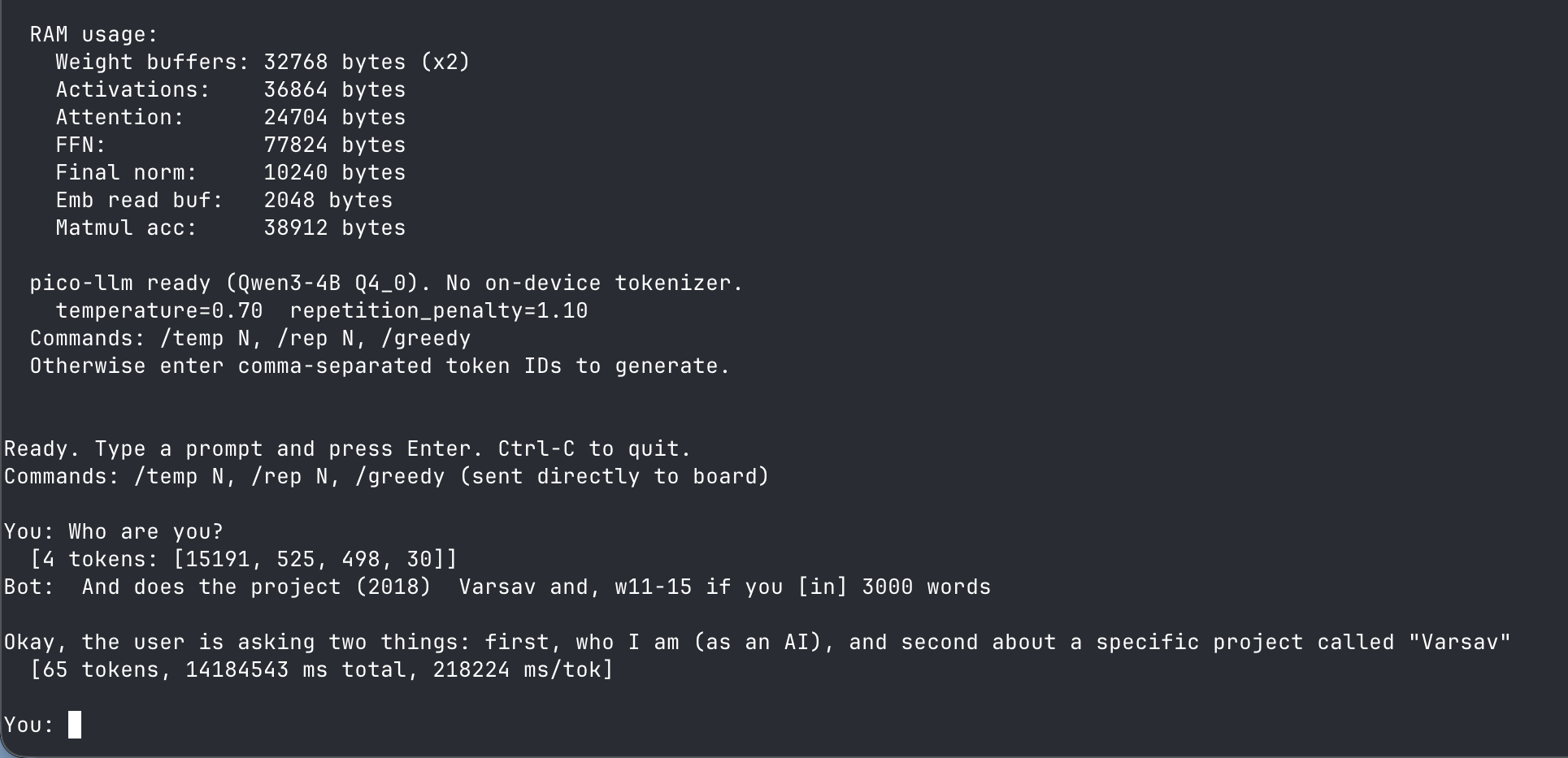
The result is a 2.16 GB model on the SD card and 330 KB RAM used. Testing out the model on the hardware gives a rate of 3 to 6 minutes per token. Like Qwen3-0.6B, it was running without its chat template. This model was also running on a slower U1 card (more on that below); a faster U3 card would probably drop the time to around 2 minutes a token. Either way, several minutes to generate one token is definitely not usable for serious work. The firmware limits the output to 64 tokens, so at that rate it would take close to four hours for a response. Most of that time is just waiting for the SD card reads. But at this point there's no serious work in sight; all of this is just to see how far the hardware and firmware can go.
Further Optimizations
Clearly our Cortex-M33 cores can't hit thousands of tokens per second like a Cerebras ASIC. These are general purpose cores designed for IoT and embedded devices. They were never designed for this workload. But we can still squeeze more performance out of them.
The first change is to get the SD card to talk to us faster. Up until this point we've been communicating to the SD card in default/SDR12 mode with a 25 MHz clock. Putting the card in SDR25/HS mode doubles the clock to 50 MHz, which should give a max read speed of 25 MB/s. My first attempt at 50 MHz SDIO gave CRC errors, which went away once I raised the GPIO drive strength on the SD card pins from 8 to 12 mA. At this time I also bumped up the system clock to 200 MHz.
The RP2350 is totally happy at 200 MHz in my experience, so bumping it further to 250 MHz should be fine. Going from 200 MHz to 250 MHz gives us 25% more clock cycles per second but was also causing instability with the SD card init. The fix was to initialize the card at 200 MHz then switch to 250 MHz after initialization. The SDIO clock divides down from the system clock, so this also took the bus from 50 MHz to 62.5 MHz, a theoretical 31.25 MB/s. That runs the card 25% past the high-speed spec, but it still worked with the SDIO interface overclocked as well.
It turns out with the SD card I was originally using this work brought almost no gains. The original U1 card just could not feed the bus at these higher speeds. A benchmark showed only 30% bus utilization, 9.31 MB/s out of a 31.25 MB/s bus. Switching to a U3 card delivered 26.33 MB/s which is above the 25 MB/s an in-spec 50 MHz bus could do.
Bonsai-1.7B: A 1-Bit Model
During this time I also tried out Bonsai-1.7B, which prism-ml claims is a true 1-bit model (1 bit per weight). At 232 MB, it was smaller on the SD card than the Qwen-0.6B. The idea was that with fewer bits per weight the amount being read from the card would be much less, and more parameters would result in a more intelligent output.
Here I also decided to utilize the DSP extensions of the Cortex-M33 cores of the RP2350. The Q1_0 kernel was written with ARM DSP intrinsics: SEL for branch-free byte selection driven by the sign bits, and SXTAB16 for packed horizontal sums. This cut the cycles per weight from 5.07 to 4.07 and took Bonsai from a first result of 46.8 s/token to 38.1 s/token. Bonsai has 2.8x the parameters of Qwen3-0.6B but only 2.09x its compute. The DSP instructions in the Q1_0 kernel are doing real work, making it run around 1.35x faster per weight than the scalar C Q4_0 kernel. In my experience the output quality wasn't that great, most likely because there is just so much less data in the 1-bit weights.
Back to Qwen3-0.6B
I found my best results came from going back to Qwen3-0.6B with a Q4_0 quantization, which reduces the model size from 570 MB to 321 MB. Since every token reads the entire model, that's 44% less reading per token. Bonsai reads 232 MB per token and Qwen3-0.6B at Q4_0 reads 321 MB per token. In the end, Bonsai reads 28% less data and still takes 50% longer. The 1-bit weights cut the bytes read but not the multiply-adds because the parameter count is 2.8x larger.
You can see all the final results below. First, the models themselves:
| Model | Parameters | Quantization | Bits per weight | Size on SD card | RAM used |
|---|---|---|---|---|---|
| Test model | 9M | int8 | 8 | 15 MB | ~114 KB |
| Qwen3-0.6B | 600M | int8 | 8 | 570 MB | ~150 KB |
| Qwen3-4B-Thinking | 4B | Q4_0 | 4.5 | 2.16 GB | ~330 KB |
| Bonsai-1.7B | 1.7B | Q1_0_g128 | 1.125 | 232 MB | ~230 KB |
| Qwen3-0.6B | 600M | Q4_0 | 4.5 | 321 MB | ~140 KB |
And here is how each one ran, in the order I ran them:
| Run | System clock | SD bus clock | microSD card | Compute per token | Bottleneck | Time per token |
|---|---|---|---|---|---|---|
| Test model, int8 | 150 MHz | 25 MHz | — | — | SD I/O | 0.69 s |
| Qwen3-0.6B, int8 | 150 MHz | 25 MHz | — | — | SD I/O | 55 s |
| Qwen3-4B-Thinking, Q4_0 | 150 MHz | 25 MHz | — | — | SD I/O | 3–6 min |
| Bonsai-1.7B, Q1_0 | 200 MHz | 50 MHz | U1 | 29 s | compute | 38.1 s |
| Qwen3-0.6B, Q4_0 | 250 MHz | 62.5 MHz | U1 | 13.3 s | SD I/O | 36.8 s |
| Bonsai-1.7B, Q1_0 | 250 MHz | 62.5 MHz | U3 | 28.0 s | compute | 29.1 s |
| Qwen3-0.6B, Q4_0 | 250 MHz | 62.5 MHz | U3 | 13.4 s | SD I/O | 19.4 s |
During the writing of this post, I added a profiling build that times each part of every token:
| U1 card | U3 card | |||
|---|---|---|---|---|
| Per token | Share | Per token | Share | |
| SD card reads | 35.8 s | 97% | 18.3 s | 94% |
| of that, overlapped with the matrix math | 13.3 s | 13.4 s | ||
| of that, Core 0 stalled | 22.5 s | 4.9 s | ||
| Everything else (KV cache, attention, norms, sampling) | 1.0 s | 3% | 1.1 s | 6% |
| Total per token | 36.8 s | 19.4 s | ||
The matrix math has no line of its own because it never costs any time of its own. Core 1 runs it while Core 0 is reading, so the 13.4 s of math on the U3 card disappears under the 18.3 s of reads, and only the leftover 4.9 s shows up as a stall. Take the math to zero and a token still costs 19.4 s.
What's Next
The profiling changed my hypothetical todo list. The plan was a DSP-optimized Q4_0 kernel, sharing the math load across both cores, or a 300 MHz overclock, but that would not be much help. The bottleneck is the SD card. Not that big of a surprise; there's a reason we don't use SD cards for high-speed memory. That is also the reason why swapping from a class 1 to a class 3 card gave a 1.90x speed increase with zero code changes. Even with the U3 card, reads still exceed compute, 18.3 s against 13.4 s per token. Any compute efficiency gains would give us nothing. Running a pure sequential benchmark shows where the real target is for the Qwen3-0.6B model. Inference sustains 18.49 MB/s while the benchmark does 23.08 MB/s on the same card. That ~20% gap seems to be the KV-cache seeks and the classifier interrupting the weight stream.
Rerunning the Bonsai model on the U3 card actually flips the next steps. Compute is 28.0 s per token while the reads disappear entirely behind it, clearly compute-bound. Only a faster kernel or fewer parameters would help. Which optimization path you take depends on which model you want to run.
Lessons Learned
- You don't need the model in RAM. You just need enough storage, sequential streaming, and a lot of time.
- Profile before you optimize. I was assuming faster math would help much more than it did. The profile showed we were waiting on the SD card and swapping out my cheap class 1 card to a class 3 card improved token speed more than all of the firmware work did.
- All of the ARM DSP code for the Q1_0 model didn't matter. The 1-bit Bonsai model was the wrong architecture choice and a more sophisticated kernel couldn't fix that.
- Bare metal is great. You can push hardware much further than you'd expect and account for every byte when it really matters.
The full source, schematics and export tooling are on GitHub: github.com/mattdeeds/pico-llm